
The New York Times is a good newspaper, but you need an account to access most pages except the front page.
I don't like signing up for accounts in general, but I read the New York Times almost every day, and the account is free, so it's worth it. Also, when you sign up for the account, it allows you to use their Portfolio feature, which we are using for class. So everyone will need to sign up for an account.
Update: as of 2011 the New York Time will only give you 20 articles for free per month; which is a nuisance. Hit the "esc" key while a page is loading to prevent the little subscription message from coming up, or delete the New York Times cookey from your browser, and you can exceed the 20 article limit.
If you don't like the New York Times portfolio, you can also use a similar feature in MSN Money.
As to the New York Times:
Here's how to sign up. Go to www.nytimes.com and look for the "Regsiter Now" link at the upper right:
That link will take you to this page:
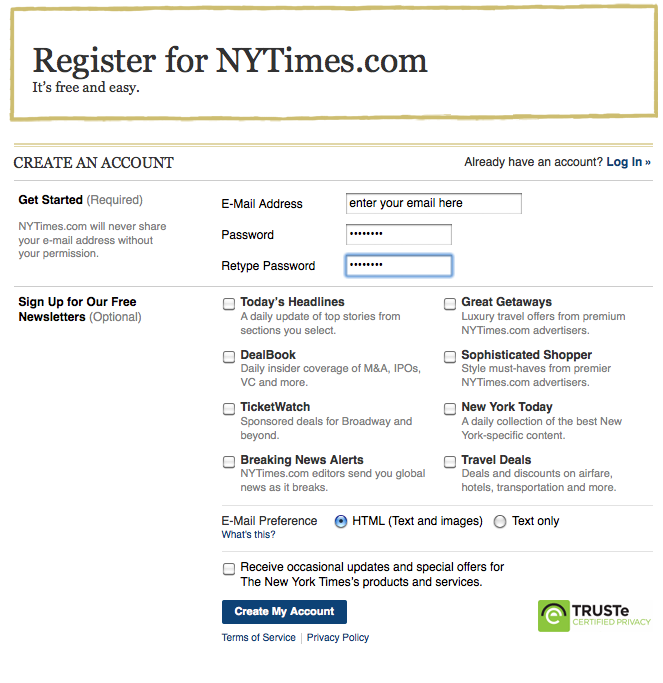
Do enter your correct email address and a good password you can remember. Do not check any of the boxes adding yourself to their mailing list, unless that's really what you want. Then click "create my account."
A portfolio is a list of stocks that we will buy. There's no real money involved, it's just a game.
To create or view your portfolio, make sure you are logged in, then find the stock area on the front page of nytimes.com and click on the "My Portfolios" link.
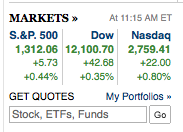
You may have to look around a little bit to find this section, but it's usually about ten inches down sort of on the right side of the front page.
You will create a portfolio and give it a name. Click where it says "My Portfolio" in the image below, and select "Create Portfolio".
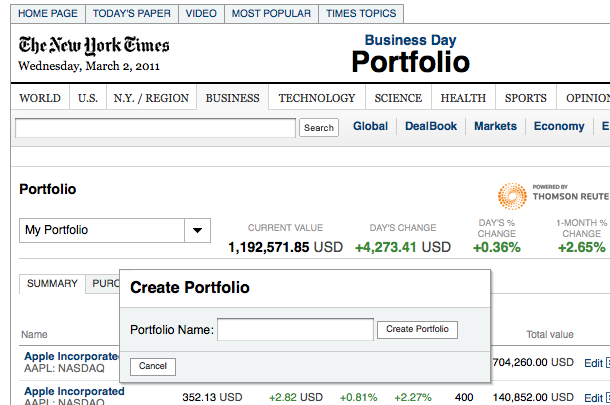
I am going to call my portfolio "Joe Student CAOT 97". This takes me to the screen where I can add some stocks to my portfolio.
I'm going to add the stock Apple. You need to know the stock symbol. Look it up on Google if you are not sure. The stock symbol for Apple is "AAPL" so here's my entry to buy 100 shares of stock:
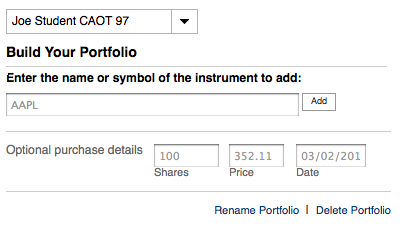
Notice that the web page adds the price for me. I just enter "AAPL" and then 100 in the shares box. The price and date are automatic. Note that this is all imaginary money. Click "Add".
This takes me to a page where I can view my portfolio:
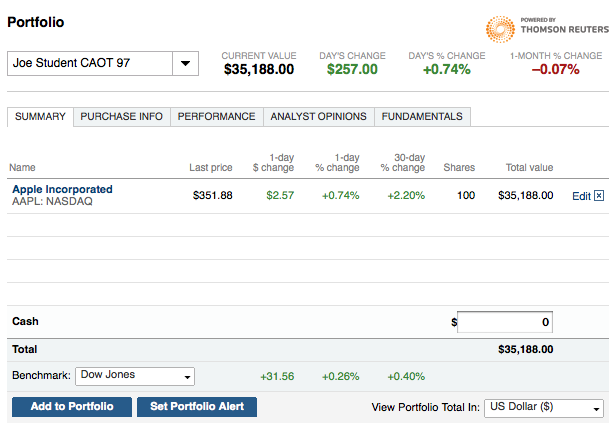
For each stock in your portfolio, there will be a line listing the last price, changes, # shares, and current value. This will change day to day as the price of the stock goes up and down. At the bottom it totals up your stocks and gives the total value of your portfolio.
You can see other views by clicking "Purchase Info" or "Performance". Try it and you will see what I mean.
If you want to add another stock, click "Add to Portfolio"
If you want to change an entry you can click "Edit" and you will see this box:
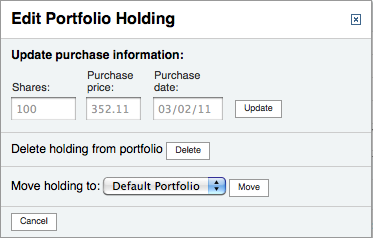
You can cange the amount, or price, or delete the stock from your portfolio.
It's all pretty easy.
We are going to buy $10,000 worth of imaginary stock. Create an account on NYTimes.com. Start a portfolio. Choose stocks that you think are interesting and we will track them as the class progresses. From time to time I will ask you to report on how your stock portfolio is doing.
If your stocks don't add up to $10,000 then add a cash amount for the balance so that your total of stocks plus cash = exactly $10,000. This way the game is fair and everyone stats with the same value of their portfolio. You enter cash in the window that lists your stock holdings. If you buy more stocks you will have to adjust your cash balance accordingly. This is pretty straightforward, you should be able to figure it out.
Good luck!